
 Anson |
 06 15th, 2024|
 最近重裝了 Manjaro,內建 Viewnior 圖片瀏覽程式預設並不支援 WebP 格式,要解決的方式也很容易,只要安裝 webp-pixbuf-loader 這個套件即可。
繼續瀏覽 »
Jun
15

Mar
2
 Using Telegram on Manjaro has always had the problem of being unable to input Chinese via gcin,Tried a few methods found online,like setting the QT_IM_MODULE path,although it was possible to switch to 'Ciyin',it still came out in English,some people say this method only works for the official version,but I tried it and still failed,in the end, I had no choice but to follow Line's approach,using Chrome to simulate an App。
繼續瀏覽 »
 i:在游標位置開始編輯。
Mar
2
 前兩天更新 Manjaro 時,rEFind 有跳出一個訊息,但我沒有仔細看,今天開機時,就發現原本蠻吸引我的開機選單,變成頗陽春的介面。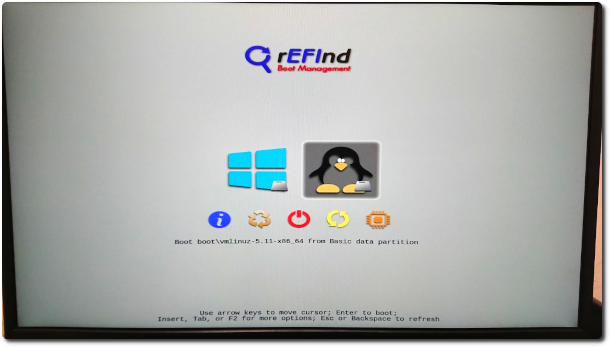
Apr
26
 幾年前曾上網搜尋 Evernote 在 Linux 的解決方案,當時 OS 是 Ubuntu,找到的結果是官方說沒打算開發,而社群能找到的替代方案則是只有 NeverNote,但 NeverNote 的介面實在用不習慣,因此後來就使用 Evernote 的 Web 版。最近把 Manjaro 修好後,又再次上網搜尋看有沒有新的解決方案,結果找到 Tusk,Tusk's interface is almost exactly the same as Evernote's,Even the way to drag notebooks is the same,Totally love it。
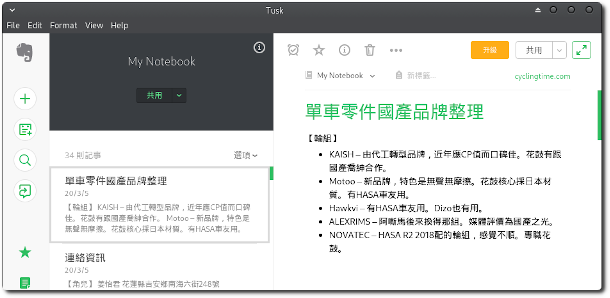
For more details, you can go to Tusk the website,The introduction is pretty detailed。
【參考連結】
Apr
12
 Line officially recommends that to use Line on Linux,you can install the Line extension through Google Chrome to achieve this,so this has always been the method I've used。just now while using it,I felt that having to open Chrome first was a bit unnecessary,因此上網找看看有沒有可以在 Manjaro 執行的其他解決方案,之後找到這篇「在 Linux 上讓 Chrome 的 Line 擴充元件當作獨立運作程式執行」的文章,剛好是我想要的(十分感謝),因此試著在 Manjaro 比照辦理,以下為步驟。
Apr
14
 週末準備開啟 XAMPP 來練習 php 時,卻怎麼也找不到 XAMPP 安裝在哪,從「套件管理員」也顯示我電腦沒有安裝,雖然納悶為啥會被移除,但也只好試著在安裝一次。從「套件管理員」安裝時,畫面卻卡在”Extracting package (this might take several minutes, don't give up!)”,The first time I let it run for over an hour and nothing happened,The second time I just let it run overnight,The result was the same,上網搜尋了一下,Other users abroad have also encountered the same situation,There also doesn't seem to be a clear solution。Later I checked the official site,It turns out the official site provides a .run installation file,The installation method is almost the same as Windows,Very convenient,r,No wonder the 'Package Manager' doesn't know I've already installed it (my memory is really awful)。
Apr
7
 Recently I've been learning Python,The course uses Anaconda as the development environment,The interface feels quite intuitive,I wanted to try installing it on Manjaro at home to practice,But it didn't go very smoothly。The first installation failed due to insufficient space,也才發現原來 anaconda 需要用掉數G的空間,應該是因為裏面有眾多套件的關係。
Jan
24

環境:Graylog OVA 檔
版本:2.5
[Change Password]
1. Confirm the location of the graylog.conf file,In the Graylog OVA environment, graylog.conf is located at /opt/graylog/conf/graylog.conf,For other environments, please refer to thisLink。
2. Edit graylog.conf using vi。
sudo vi /opt/graylog/conf/graylog.conf
### Common vi commands ###
 a 進入編輯模式
 esc 回到指令模式
 :w Save
 :q Exit
 :q! When you forget to open with sudo and don't have permission to save,Force exit。
Dec
28
開源 log 系統 — Graylog 有提供 OVA 的虛擬映像環境供使用,預設的網卡設置會以 DHCP 為初始設定,因此開起來後如果沒配發到 IP,會有部份錯誤訊息,如要改成固定 IP,可依照下列步驟進行:


