
 Anson |
 10 20th, 2018|
 之前有寫一篇「Deadbeef直接播放RAR檔」的文章,當時的作業系統是 Ubuntu 12.10,現在換 Manjaro Linux 後,同樣需要讓 DeaDBeeF 可以播放RAR檔,以 “deadbeef” 做關鍵字搜尋整個檔案目錄後,You can find DeadBeeF's lib path at “/usr/lib/deadbeef/”,So you just need to copy the downloaded plugin to this path。
Oct
20

Oct
7
 自從在 Windows 環境使用 QTranslate,並愛上他的熱鍵翻譯功能後,就在思索 Linux 的相關解決方案。前兩天上網查了 Linux 的翻譯軟體,看起來還是以前的一些老面孔,沒有什麼新鮮貨出現,後來再查看 StarDict (星際譯王)時,發現它因為版權爭議問題,已經被下架了,不過其網頁還有推薦幾套替代方案,稍微比較之後,選擇試用 GoldenDict 。
繼續瀏覽 »
Sep
24
 不少常用的軟體在 Manjaro Linux 平台上,是透過 AUR (Arch User Repository — 由社群推動的使用者軟體庫) 提供,包括Chrome也是,因此要在 Manjaro Linux 安裝 Chrome,就要先開啟「套件管理員」中的「AUR」。
繼續瀏覽 »
Sep
21
 GIMP是我主要的圖片編輯工具,最近改使用Manjaro後,GIMP的版本升到了2.10,介面好看不少,不過剛剛準備要進行圖片背景透明化時,卻怎麼樣也找不到選項,只好上網搜尋,好在有日本網友分享說明。
繼續瀏覽 »
Sep
21
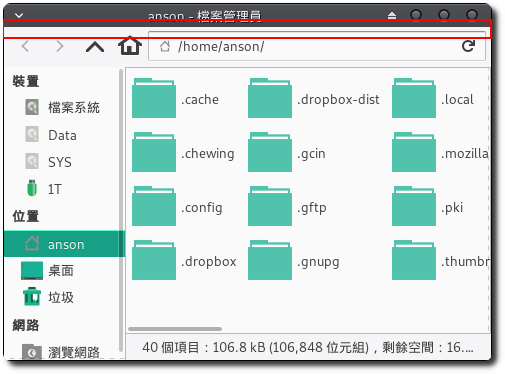
 Just now while using the file manager,I originally wanted to hide the shortcut panel on the left,Unexpectedly pressed the wrong button,And instead hid the top menu bar,After that, I couldn't bring it back again。
Sep
21
 After switching to Manjaro Linux,I also changed the multi-boot manager from grub to rEFind,rEFind的畫面相較grub好看許多,所以我還蠻喜歡的。用了幾次後,發現開機預設都是Windows,由於我除了玩遊戲,其他作業都是在Manjaro進行,因此想把預設選項改成Manjaro,好減少那一咪咪的選擇時間。
繼續瀏覽 »
Sep
21
 在使用文字編輯程式時,蠻常會有使用「搜尋」及「取代」功能的需求,尤其是「取代」功能,可以大大減少我們的作業時間,而在某些情況下,我們會需要 搜尋/取代 換行符號,此時wxMEdit的好處就出現了,我們可以透過其「正規運算式」的搜尋來達成。
繼續瀏覽 »
Sep
21
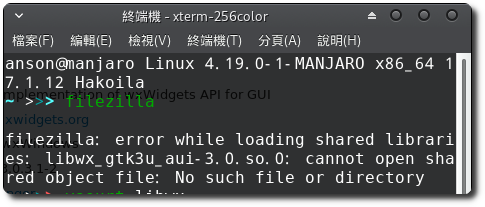
 剛剛要使用FileZilla時,啟動了幾次都沒畫面出來,就改用Console執行filezilla,結果出現下面錯誤:
filezilla: error while loading shared libraries: libwx_gtk3u_aui-3.0.so.0: cannot open shared object file: No such file or directory
Sep
15
這幾年不管在Windows還是Linux環境已經習慣使用MadEdit做為主要的文字編輯器,最近從ubuntu跳到Manjaro後,在安裝wxMEdit時真是吃足了苦頭,光是在編譯時就出現不少問題,試過MadEdit、wxMEdit、Madedit-Mod都卡在編譯,連透過AUR安裝也一樣編譯失敗,後來總算找到一篇文章資訊,提到有個網站有提供編譯好的wxMEdit (for Arch Linux),經過網站教學安裝,總算安裝成功,差點沒痛哭流涕。
繼續瀏覽 »
Mar
20
 一直以來都是利用Clonezilla live作為備份軟體,由於常需要使用,後來就做成開機隨身碟,以前都是透過UNetbootin來製作,最近要重做時,卻發生卡在Clonezilla live開機選單的情形,後來才在官方看到說明,他們現在已不建議使用UNetbootin製作,Instead, it is officially released through UNetbootin as Tuxboot。
The interfaces of Tuxboot and UNetbootin are more than 90% the same,They are mainly used to create bootable USB drives for Clonezilla live、Gparted live and similar tools,You can choose the media source as an ISO file or download directly online,The steps are very simple,The creation process does not format the USB drive,Existing data will be retained,However, it is still recommended to back up beforehand。


