
 Anson |
 04 29th, 2020|
 前陣子 Synology NAS 的空間少了好幾 TB,後來依照官方的教學,透過 SSH 連進系統查看,才發現原來是試用的 CloudStation 目錄,產生了極大的資料量,因為只是要試用而已,功能也不符合我需求,後來便將其移除,And manually remove the hidden @cloudstation folder。
Apr
29

Apr
27
 今天發生一個蠻特別的情況,在 Windows Server 2012 R2 中調整一台印表機的「安全性」,將 “Everyone” 的「列印」權限由「允許」改成「拒絕」後,它就從「印表機」頁面消失了,從「裝置管理員」去查看,也同樣消失,但是在 Excel 的列印畫面則是還看得見,從 “\\localhost” 也還看得見它 (原本就有開啟分享列印)。試過重啟 Print Spool 服務以及重新開機,結果都還是一樣,因此只好試著改用指令模式,把權限改回來。
Apr
20
The company has two Synology NAS devices for backup,One of them serves as an offsite backup for the other,This is done using Synology's Hyper Backup application。Since the amount of backup data is considerable,Therefore, if there are any unexpected issues,It may cause the backup process to fail to complete overnight,而影響到白天的頻寬。
Apr
18
 最近 Fortinet 似乎改變韌體下載的政策,如果已經過了保固,就算登入會員,也無法下載韌體,剛好最近手上的一台 110C 有點異常,需要重刷韌體,But couldn't find any firmware to download, which was frustrating。Later, I asked the manufacturer for help and finally got a firmware,Then I searched online for the firmware files currently available,Keeping them here as a backup,Also providing them for friends in urgent need。
Apr
18
【Set Interface IP and Access Permissions】
config system interface
edit port1
set ip 192.168.0.100 255.255.255.0
set allowaccess https http (或 append allowaccess http)
end
【Log Not Recorded】
get log memory filter
# 如果 Severity 為 warning
config log memory filter
set severity information (set severity ? 可以查看所有層級)
【參考連結】
- Set FortiGate VM port1 IP address
- 【Fortinet】Memory Log Not Recorded @ Mini Goose's World :: Pixnet ::
Apr
9
網路上針對 Fortigate SSLVPN 的教學文章多半是在連線成功後,就直接透過 Fortigate 上網,因為實際應用 SSLVPN 都是為了解決封網問題,之前曾經把設定改成讓 client 端只有在存取內部資源時走 VPN,上網就從自己電腦直接出去,不過因為沒留下紀錄,剛剛又花了一些時間研究才搞定,因此還是記錄一下。
Mar
27
最近子公司借測一台新的 Fortigate,連上去後先檢查一下韌體版本,結果又是大版本異動,原先為 5.6,這次是 6.0,每一次的版本異動,在與我的 Sonicwall 建立 Site to Site VPN 時,都讓我吃足苦頭,這次不意外的也是沒有一次搞定,因此又有了這篇文章的誕生,不過相較前兩次,這次的除錯過程相對順利很多。
Mar
9
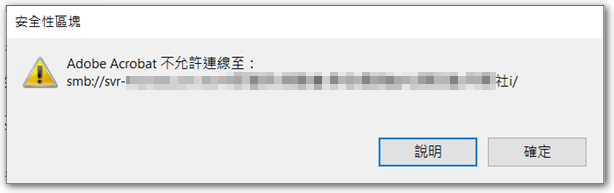
 近期新版的 Adobe Reader 在開啟區網(網芳)上的 PDF 檔時,有時會跳出 “Adobe Acrobat does not allow connection to” 的錯誤訊息,如要避免此情形發生,需調整設定。
Mar
4
 ZYXEL GS1920-48v2 的 VLAN/TRUNK 設法跟我以往設過的 HPE、LINKSYS 稍有不同,這邊做個記錄。


