
 Anson |
 09 24th, 2020|
| 型號 | CPU | RAM(G) | FLASH(G) |
| TZ350 | Mips64 Octeon 1200MHz *2 | 1 | 0.064 |
| TZ500 | Mips64 Octeon 1000MHz *4 | 1 | 0.064 |
| NSA 4600 | Mips64 Octeon 1100MHz *8 | 2 | 1 |
| TZ 215 | Mips64 Octeon 500MHz *2 | 0.512 | 0.032 |
| TZ210 | Mips64 Octeon 499MHz | 0.256 | 0.032 |
| NSA 2400 | Mips64 Octeon 500MHz *2 | 0.512 | 0.512 |
| NSA 240 | Mips64 Octeon 500MHz *2 | 0.256 | 0.032 |
Sep
24

Sep
9

 BookStack 官方提供的
Aug
10
 [AD ADS (AD Lightweight Directory Services)】
◎ Microsoft's pure LDAP service。
◎ Standalone program,Can be installed inside/outside the domain,Multiple installations possible。
◎ Can synchronize AD DS account information via adamsync,But cannot sync passwords,Unless using other tools,such as Microsoft's FIM、MIM,But a license needs to be purchased。
◎ If you plan to allow external users to access the LDAP directory with a single account,可以考慮。
繼續瀏覽 »
Jul
30
 ◎ Server OS: Windows Server 2019
◎ OpenVPN: OpenVPN 2.4.9 (Community)
◎ AD 驗證元件: Auth4OpenVPNv2.0
◎ Client OS: Windows 10
繼續瀏覽 »
Jul
27
 【目標】
【目標】
◎ 使用 AD 做為帳戶驗證方式。
◎ Client 端使用獨立網段,並可自動取得 IP。
◎ Client 端僅針對特定網段的流量會流量 VPN,上網 (Internet) 不會。
◎ Client 端可以連到企業內部的其他網段。
Jul
27
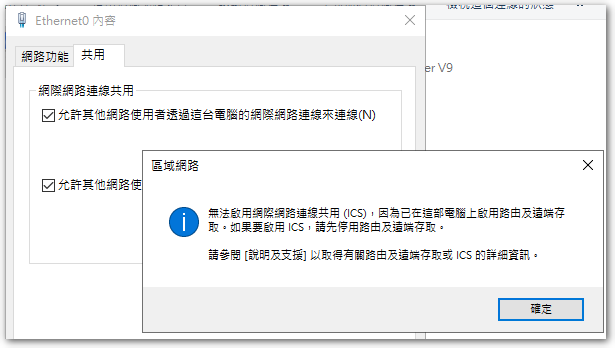
Today, while testing Open VPN,Tried to enable 'Network Connection Sharing',但是卻跳出下面訊息:
無法啟用「網際網路連線共用 (ICS)」,因為已在這部電腦啟用路由及遠端存取。如果要啟用 ICS,請先停用路由及遠端存取。
Jul
20
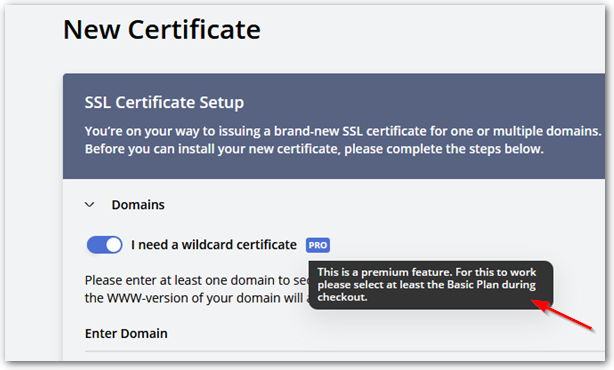
 上回抱著嘗試的心態在 SSL For Free 申請 Wildcard 憑證 (*.abc.com),沒想到申請成功了,原本還以為 Let’s Encrypt 只能針對個別網址進行申請。最近由於憑證快滿三個月,便準備再進行申請,卻發現 SSL For Free 被 ZeroSSL 買下來後,針對 Wildcard 憑證的申請,只能以付費的方式購買,因此只好放棄此平臺的服務。
Jul
16
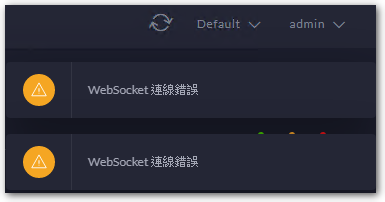
 忘了從哪一版開始,進入 Unifi AP Controller 右上角都會跳出一個 WebSocket connection error 的訊息,猜想應該是因為沒有使用 Unifi 閘道器產品的關係,也就沒有特別理會。
Jul
7
◎ regedit。
◎ HKLM\SOFTWARE\Microsoft\Windows NT\CurrentVersion\SPP\Clients。
◎ 新增一個名為 “{09F7EDC5-294E-4180-AF6A-FB0E6A0E9513}” 的「多字串值」,值輸入 1。


