
 After switching to Manjaro Linux,I also changed the multi-boot manager from grub to rEFind,rEFind的畫面相較grub好看許多,所以我還蠻喜歡的。用了幾次後,發現開機預設都是Windows,由於我除了玩遊戲,其他作業都是在Manjaro進行,因此想把預設選項改成Manjaro,好減少那一咪咪的選擇時間。
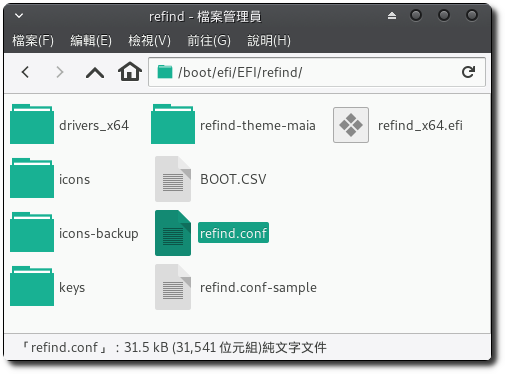
1. 在”/boot/efi/EFI/refind/”底下找到「refind.conf」。
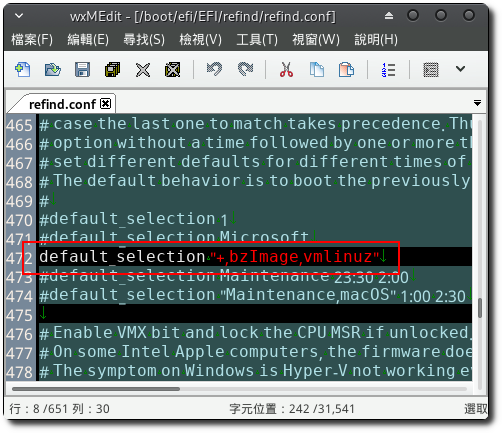
2. 以root權限開啟後,搜尋”default_selection”,可以找到幾個設定範例,我是使用「default_selection “+,bzImage,vmlinuz”」,By default, the operating system selected during the last boot will be chosen。
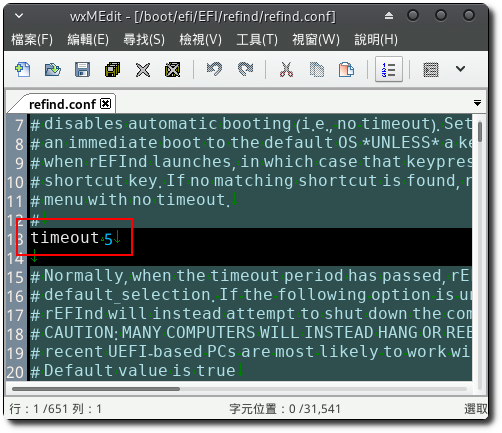
3. You can also search”timeout”,Adjust countdown time。
【參考連結】


Leave a Reply