
 Anson |
 10 3rd, 2009|
 執行./configure時若出現"configure: error: cannot run /bin/bash ./config.sub",請至「Synaptic套件管理程式」搜尋並安裝"libtool"。
Oct
3

Oct
3
執行./configure時若出現"configure: error: You are missing glib"的訊息,可至「Synaptic套件管理程式」搜尋"libglib2.0-dev"套件,將其裝上即可。
Oct
3
執行./configure時若出現"configure: error: You are missing security/pam_modules.h",請至「Synaptic套件管理程式」搜尋並安裝"libpam0g-dev"即可。
|
|
Oct
3
執行./configure時若出現"configure: error: Library requirements (gnome-keyring-1) not met",請至「Synaptic套件管理程式」搜尋並安裝"libgnome-keyring-dev"即可。
Sep
28
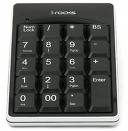 上次為了試符號,不知道怎麼按的,搞到右邊的數字鍵盤都無法key數字,重開機也沒用,後來上網找,原來是不小心給他切換到滑鼠模式:)
按 CTRL + SHIFT + NumLock 即可切換 數字 / 滑鼠 模式的方式
[Related Links]
Sep
28
 一直以來在打文章時,若要輸入一些特殊符號如間隔號"‧"或是破折號"—"等,都會先按下CTRL+ALT+,來呼叫小鍵盤,再用滑鼠去選擇符號,後來某次不小心按到ㄒ加空白鍵,卻出現℃,才知道有部份符號可以用這種方式key出來。幾天後,又因按錯鍵而按出破折號,便決定上網把一些常用的符號輸入方式給找出來了。
Aug
8
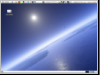 I've been using Ubuntu for two years now,I always felt the default theme didn't suit my taste,So I would change the default orange to the built-in blue theme clearlooks(Clear Looks)。But this is just changing the colors,The top taskbar and dropdown menu still aren't very great,I've finally found a theme package that's not bad—Bisigi Project,It will let me change things up nicely。
Mar
24

Feb
2
昨兒個要開VirtualBox的作業系統時,給我出現了這麼一個"Verr_Vm_Driver_Not_Installed"的錯誤訊息,一時趕時間也沒仔細看,就直接重開機進VISTA去完成我要做的事。剛剛再給他開來瞧瞧,原來只要依照上面的說明,這個問題粉容易就可以解決了。


