Anson |
 06 23rd, 2024|
 早期在使用 Ubuntu 有遇到 ubuntu 會把 BIOS 時間設成 UTC 時間,這樣導致我進 Windows 後,時間也錯了。最近重灌 Manjaro 又遇到一樣的情形,查了一下資料,設定方式跟以前在 ubuntu 時是一樣的指令。
繼續瀏覽 »
Jun
23

Jun
15
 最近重裝了 Manjaro,內建 Viewnior 圖片瀏覽程式預設並不支援 WebP 格式,要解決的方式也很容易,只要安裝 webp-pixbuf-loader 這個套件即可。
繼續瀏覽 »
Mar
2
 Using Telegram on Manjaro has always had the problem of being unable to input Chinese via gcin,Tried a few methods found online,like setting the QT_IM_MODULE path,although it was possible to switch to 'Ciyin',it still came out in English,some people say this method only works for the official version,but I tried it and still failed,in the end, I had no choice but to follow Line's approach,using Chrome to simulate an App。
繼續瀏覽 »
Dec
31
我的電腦固定有外接一顆 NTFS 的硬碟,最近開機後,在 Thunar 點擊這顆硬碟,都會掛載失敗,錯誤訊息時 “error mounting wrong fs type bad option bad superblock…”。
Jan
2
During program installation,The message 'No more space left on device' appears,Check with df -h,It means /tmp is full。
My /tmp is not a separate partition,Is shared with / Same partition,And / Still has space,所以可以透過重新 mount 的指令來暫時增加 /tmp 的空間。
df -h /tmp
#查詢 /tmp 佔用空間。

sudo mount -o remount,size=15G /tmp/
#將 /tmp 大小改成 15G。

df -h /tmp
#確認 /tmp 的佔用 % 是否改變。
若要清空 /tmp,可以執行以下指令:
sudo rm -r /tmp/*
【參考連結】
 i:在游標位置開始編輯。
Mar
2
 前兩天更新 Manjaro 時,rEFind 有跳出一個訊息,但我沒有仔細看,今天開機時,就發現原本蠻吸引我的開機選單,變成頗陽春的介面。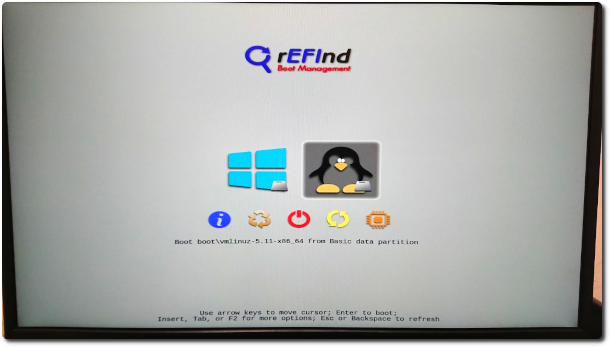
Jun
25
先前有寫一篇 Ubuntu解壓縮亂碼 的文章,到了 Manjaro 後,再次遇到老問題,一樣是在 Omusic 買歌,買完解壓縮變亂碼,而依照之前的方式處理,這次卻無效了。
Apr
26
 幾年前曾上網搜尋 Evernote 在 Linux 的解決方案,當時 OS 是 Ubuntu,找到的結果是官方說沒打算開發,而社群能找到的替代方案則是只有 NeverNote,但 NeverNote 的介面實在用不習慣,因此後來就使用 Evernote 的 Web 版。最近把 Manjaro 修好後,又再次上網搜尋看有沒有新的解決方案,結果找到 Tusk,Tusk's interface is almost exactly the same as Evernote's,Even the way to drag notebooks is the same,Totally love it。
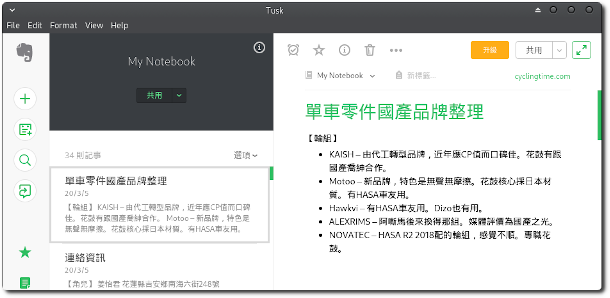
For more details, you can go to Tusk the website,The introduction is pretty detailed。
【參考連結】
Apr
26
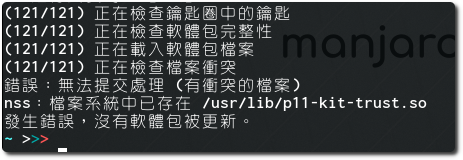
Today, while updating Manjaro,this kept popping up “nss:p11-kit-trust.so already exists in the filesystem at /usr/lib/” 的錯誤,後來試著以下指令方式 (sudo pacman -Syyu) 結果也是一樣,上網查詢,結果是正常的,因為舊版的某些錯誤,所以更新時,需要增加參數以強制覆蓋。