
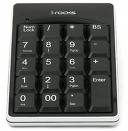
 上次為了試符號,不知道怎麼按的,搞到右邊的數字鍵盤都無法key數字,重開機也沒用,後來上網找,原來是不小心給他切換到滑鼠模式:)
按 CTRL + SHIFT + NumLock 即可切換 數字 / 滑鼠 模式的方式
[Related Links]
上次為了試符號,不知道怎麼按的,搞到右邊的數字鍵盤都無法key數字,重開機也沒用,後來上網找,原來是不小心給他切換到滑鼠模式:)
按 CTRL + SHIFT + NumLock 即可切換 數字 / 滑鼠 模式的方式
[Related Links]


Leave a Reply