
 Anson |

 05 18th, 2012|

 System Volume Information is the folder where Windows stores system restore data,Usually after turning off system restore,This folder won't take up much disk space,But if, due to certain factors, this directory takes up a large amount of space,,you need to use some techniques to clear this directory.。
繼續瀏覽 »
May
18

May
18
The options 'Connect Network Drive' and 'Disconnect Network Drive' in XP,can be found in the 'Tools' menu on the toolbar of File Explorer.,But in Windows 7,The top menu bar only shows 'Connect Network Drive' by default。

May
18
先前在裝設虛擬電腦時,遇到過在裝完Windows 2000後,磁碟空間的容量大小被限制在1百多G。上網搜尋後,在微軟知識庫找到了解決方式。
打開登入編輯器regedit,找到下面路徑:
HKEY_LOCAL_MACHINE\SYSTEM\CurrentControlSet\Services\atapi\Parameters
新增一個EnableBigLba 的DWORD,值為1,重開機後即可正確辨識。
[Related Links]
Apr
24
If you are looking for the WGA Tool. You can download it from here.
It was caught from Windows Update (in XP SP3).
Jan
12
After Windows updates,The system will, by default, pop up a message every few minutes asking whether to restart,If you find it annoying,You can change the interval of the prompts in 'Group Policy'。
Aug
25
在桌面按滑鼠右鍵無法出現選單時,請開啟regedit,到以下路徑:
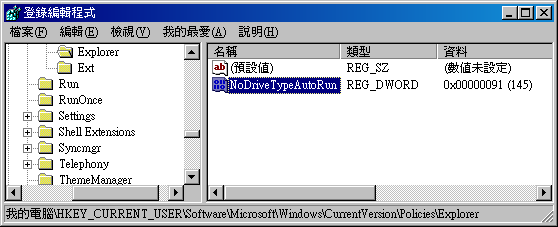
HKEY_URRENT_USER\Software\Microsoft\Windows\CurrentVersion\Policies\Explorer
將右方的「NoViewContexMenu」鍵值移除即可。
一般Explorer底下只會有「NoDriveTypeAutoRun」鍵值,因此如果有其他鍵值,有可能就是有其他功能被鎖住,可依照鍵值名稱去瞭解看看。
[Related Links]
- 我的windowsXP桌面不能按鼠标右键_爱问知识人
Aug
22
如果「開始」-「所有程式(Program Group)」裡的連結突然不見了一大半,通常有兩種可能,一個是真的不見了,另一個則是屬性被設為隱藏了。前者需要一個一個建回來,或者從別台電腦複製同類型的link,後者就簡單多了,把「隱藏」屬性取消即可。

Aug
22

Aug
19
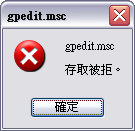
執行gpedit.msc時,若出現「存取被拒。」的訊息,有可能是與啟動的關聯程式MMC(Microsoft Management Console)設定跑掉導致,因此要修正這個問題,只須重新設定檔案關聯即可。
 當開機後,發生桌面所有捷徑、檔案的物件都消失時,可以試試下面解決方式。


