Anson |
 12 13th, 2017|
 In Microsoft's permission design,there is”Remote Desktop Users”的權限給遠端桌面使用者使用,但實務上此權限常使一些應用程式無法完全正常操作,使得需開放”Administrator”權限給給遠端桌面的使用者,而User在使用遠端桌面時,有時會忘了自己在操控遠端的電腦,在要下班時,Maybe they just pressed the remote shutdown or reboot button directly,Causing the server to go offline。
繼續瀏覽 »
Dec
13

Dec
12
Recently, the company's Windows 10 Notebooks have been having quite a few Wi-Fi issues,One of them would disconnect halfway through use,and afterwards could no longer obtain an IP address。Upon inspection,it was found that the wireless MAC address of this notebook actually changes,The next time it disconnected,inspection revealed the MAC address had changed again。
繼續瀏覽 »
Dec
7
 近日公司外點發生VPN異常,經廠商協助查詢後,乃因外點特定user佔據頻寬所導致。在發生問題的當下,其實已經透過廠商的MRTG報表看出是流量問題,但並無法進一步釐清是什麼原因造成流量異常,便思考著是不是有什麼方式可以自己做個簡單的流量監控,待發生問題時,可以查出是哪個IP造成,甚至能查出所使用的服務為何。
繼續瀏覽 »
Dec
4
今天有台網域中的電腦,在更改”電腦名稱”後並未立即重開機,後來因故暫時離開而畫面鎖住,等要再登入時,畫面卻出現”伺服器上的安全性資料庫沒有此工作站信任關係的電腦帳戶”的錯誤訊息。
繼續瀏覽 »
Nov
24
使用遠端桌面時,預設會把本機的印表機導向至遠端桌面工作環境,But if bandwidth or other factors need to be considered and this feature needs to be turned off,,In addition to unchecking it in the User-side connection tool,,It can also be directly disabled on the Server-side.。
繼續瀏覽 »
Nov
24
When there is a certain number of remote desktop users,,會佔用到不少記憶體,因此可以在遠端桌面工作伺服器設定將已經中斷連線的使用者,在中斷一定的時間後登出,以節省伺服器資源。
繼續瀏覽 »
Nov
23
【環境】
- 已有一台遠端桌面授權伺服器
- 裝設第二台遠端桌面伺服器
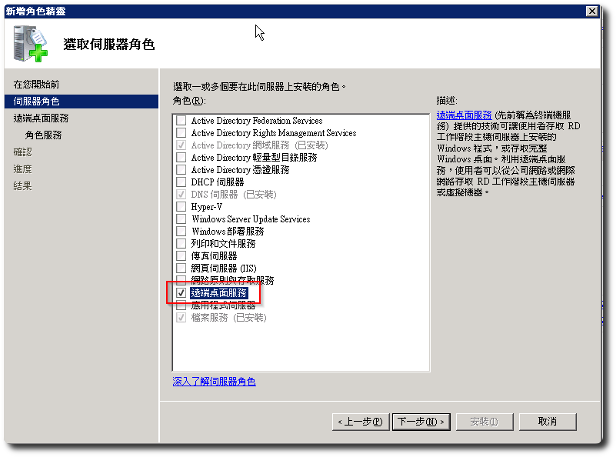
【伺服器角色】
- 新增”遠端桌面服務”
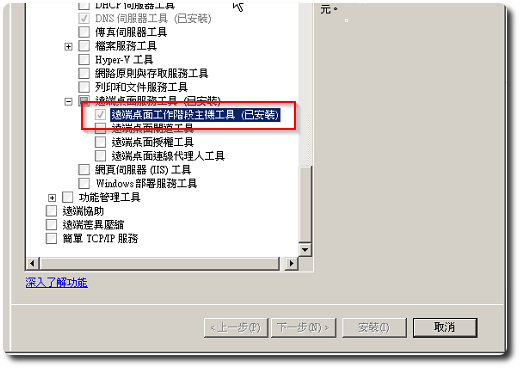
【新增功能】
- 新增”遠端桌面工作階段主機工具”
Tips. 假設原本已是使用遠端桌面操作,在安裝完上述動作重開機後,It is possible that remote desktops cannot log in,,Because the license server has not been set up yet.,建議先行安裝UltraVNC等其他遠端遙控程式備用。
繼續瀏覽 »
Nov
23
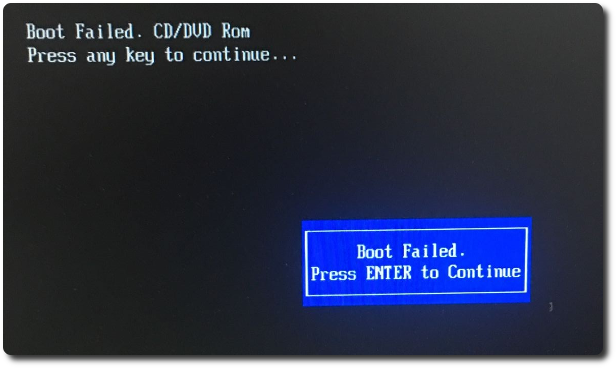
 在教大陸同事重裝Server的作業系統時,用ServerGuide開機卻出現Boot failed,以往從沒遇過這種情形,而該光碟拿到PC開機卻是可以開機的,表示光碟燒錄沒問題,不過也讓我想到可能是UEFI的問題,詢問同事PC的購買年份,果然是比Server新的多。
Nov
21
公司有台NB,Some parts of the impression feel a bit strange,Previously performed a Windows restore,Temporarily solved the problem,This time when testing Windows Update,Found that the service could not start,會出現”0x8007277a”的錯,而ESET防毒的驗證程式也異常。
繼續瀏覽 »
Nov
20
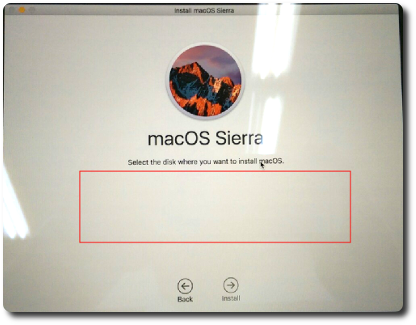
 Recently, I handled a Macbook,The data on the hard drive had been completely erased,Not even the partitions were left,I was wondering how to install Mac OS like this,After checking online, I found out,It turns out Apple's OS can be downloaded and installed directly from the internet,This surprised me quite a bit,Instantly, my impression of Apple products improved significantly,因為實在太人性化了。接著要準備選擇磁區安裝時,卻沒有出現任何硬碟項目讓我選擇,本以為硬碟有問題,上網爬文後,才知道只是沒建立磁區而已,且透過開機內建的磁碟工具即可解決。