
 十五年前曾寫了一篇《Outlook 2003 無法顯示圖片》,當時的清除 OutlookSecureTempFolder 方法,解決了不少 Outlook 的怪問題。近期發現 Outlook 再度發生無法顯示圖片的問題,我這次版本是 2019,試了網路上各種方法都無法解決,最後總算靠同事的小建議獲得解決,So I'm recording this,Hope it can help others。
The advice on the internet (didn't work for me)》
Outlook
1. Trust Center → Automatic Downloads,uncheck。
2. stop loading add-ins。
3. run Outlook in Safe Mode。
4. rebuild profile。
temporary files
1. clear the temporary files in the OutlookSecureTempFolder path。
※ I only realized while writing this,that my previous article didn't recommend clearing temporary files,but deleting the registry value,so that a new path is generated,不過我也試過直接指定一個別的路徑給他,依然無效。
2. 清除 RoamCache 暫存檔。
網際網路選項
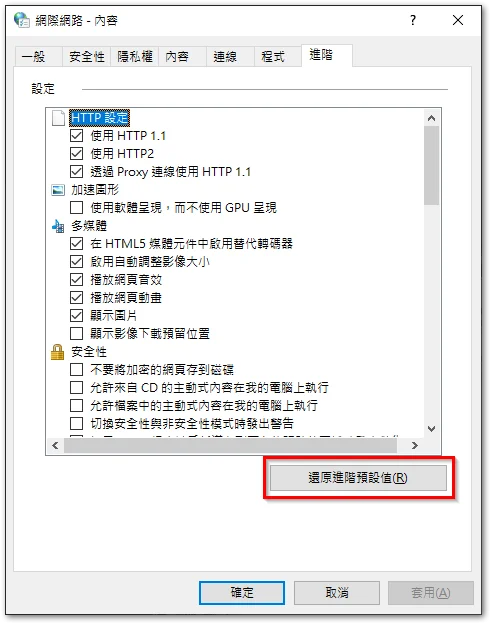
1. 勾選「顯示圖片」。
2. 取消勾選「不要將加密的網頁存到磁碟」。
《最後解決方法》
最後是同事建議我去「網際網路選項」點選「還原進階預設值」,就解決了這個無法顯示圖片的問題。可惜無法確認是單一選項造成這次無法顯示圖片的問題,還是「還原進階預設值」的動作修復了「網際網路選項」底層的異常。
2025/12/11 更新
今天又遇到同樣狀況,這次逐項測試,最後確定是「不要將加密的網頁存到磁碟」,這個選項造成,只要將其取消勾選即可。

- Laosen's IT Tales » Outlook 2003 無法顯示圖片


Leave a Reply