

環境:Graylog OVA 檔
版本:2.5
[Change Password]
1. Confirm the location of the graylog.conf file,In the Graylog OVA environment, graylog.conf is located at /opt/graylog/conf/graylog.conf,For other environments, please refer to thisLink。
2. Edit graylog.conf using vi。
sudo vi /opt/graylog/conf/graylog.conf
### Common vi commands ###
 a 進入編輯模式
 esc 回到指令模式
 :w Save
 :q Exit
 :q! When you forget to open with sudo and don't have permission to save,Force exit。
3. Use tools like OpenHashTool,Encrypt the password using SHA-256,Generate the password after the following calculation。
f375f401ddc698af533f16f8ac1e91c1
4. Find 'root_password_sha2 =',Change the value behind it to the string just generated。

5. Save and exit,Enter the following command,Restart the graylog-ctl service。
sudo graylog-ctl restart
Tips.

另外有個 sudo graylog-ctl set-admin-password 指令可以修改 admin 密碼,但在我的環境測試並沒有修改成功。(graylog-ctl 指令用法)
[Change time zone]
1. Edit graylog.conf using vi。
sudo vi /opt/graylog/conf/graylog.conf
2. Find 'root_timezone =' and change the time zone behind it to Asia/Taipei (Complete time zone list)
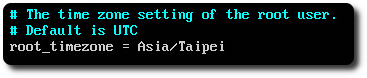
3. Save and exit,Enter the following command,Restart the graylog-ctl service。
sudo graylog-ctl restart
【參考連結】
- RackPan的學習備忘錄: Graylog Server 安裝及設定
- Default file locations — Graylog 2.5.0 Documentation
- server.conf — Graylog 2.5.0 Documentation
- Joda-Time – Java date and time API – Time Zones
- The graylog-ctl script — Graylog 2.5.0 Documentation


Leave a Reply