
 Anson |
 09 6th, 2018|
 今天遇到一個蠻少見的問題,某份帶有表格的Word檔在列印時,其中一個欄位的文字會消失,經過測試,不論是實際列印出來,還是印成PDF或XPS都會有問題,但是改用Word 2013及2007打開後列印,就沒有問題。
Sep
6

Jul
5
--新增信箱帳號
New-Mailbox -database "First Storage Group\Mailbox Database" -Name "jimmy" -UserPrincipalName jimmy@abc.com.tw -Password (ConvertTo-SecureString -String 'j!123456'  -AsPlainText -Force) -FirstName jimmy -LastName chen


--移除信箱帳號
Remove-Mailbox -Identity "carrie"


--取得所有信箱大小並存於桌面
Get-MailboxStatistics | Sort-Object TotalItemSize -Descending | ft DisplayName,@{label="TotalItemSize(KB)";expression={$_.TotalItemSize.Value.ToKB()}},ItemCount >mailboxes.txt


--新增群組
New-DistributionGroup -Name "whole" -OrganizationalUnit "abc.local/Users" -SAMAccountName "whole" -Type "Security"


--新增群組成員
Add-DistributionGroupMember  -Identity "testg"  -Member "test@abc.com.tw"


--允許外部寄信給群組
Set-DistributionGroup -Identity "whole" -RequireSenderAuthenticationEnabled $false


--新增聯絡人
New-MailContact -Name "Jackie" -ExternalEmailAddress jackie@abc.com -OrganizationalUnit "abc.local/Users"
May
25
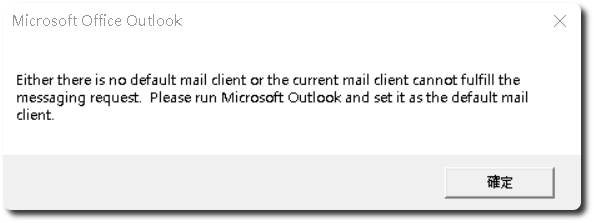
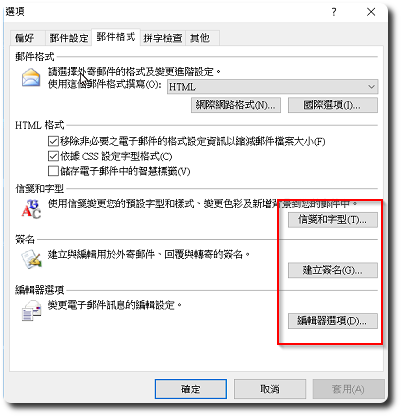
 有台電腦環境是Windows 10 + Outlook 2007,前兩天更新完Windows Update後,Outlook會不定時跳出”Either there is no default mail client or thecurrent mail client cannot fulfill the messaging request. Please run Microsoft Outlook and set it as the default mail client.”的錯誤訊息,同時點擊Outlook的「信箋和字型」、「建立簽名」、「編輯器選項」都會沒有反應。
Dec
22
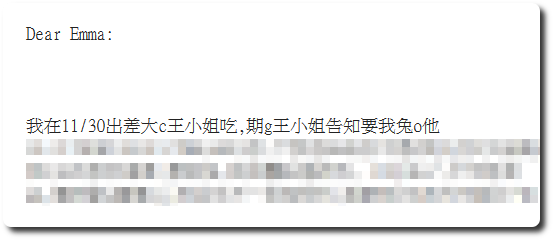
Yesterday, a colleague reported that when sending emails to clients,some emails turned into garbled text。After obtaining the problematic emails,they were plain text with garbled characters,while the sender’s sent items backup showed them in HTML format,這跟以往遇到的情形不太一樣,以往是寄出時,使用了RTF的格式,且對方不是使用Outlook,才會造成內容損壞。
Dec
21
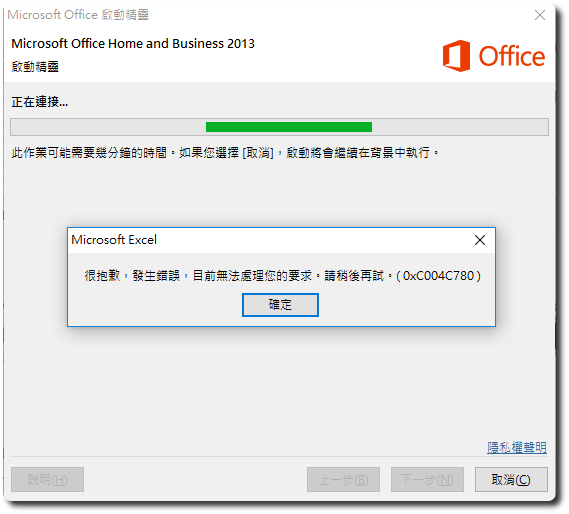
 昨日在安裝新電腦,啟用Office 2013序號時,跳出一個「很抱歉,發生錯誤,目前無法處理您的要求。請稍後再試。(0xC004C780)」,Then it jumps to the screen where you have to choose online or phone activation。
Jun
2
 早年使用 AppServ 架的網站遭入侵,Couldn't figure out the reason,Wanted to update Apache、PHP、But the MySQL version was limited by Joomla extension compatibility, so couldn't proceed,Later, there was a need to create another website,Originally planned to switch to XAMPP,But when reading the official XAMPP documentation,Surprisingly, the official recommendation is not to use this software in a production environment,若非得使用,官方雖有建議調整部份設定值,To improve security,但又提醒你,這只能稍微增加一點點安全性而已 (好直白的官方啊~哈),因此便動手研究獨立安裝 Apache、MariaDB、PHP 及 phpMyAdmin。
繼續瀏覽 »
Oct
11
 以往多是遇到Outlook的超連結無法開啟的問題,今天倒是頭一次遇到Excel的超連結出現「發生未預期的錯誤」,直覺先測試Outlook有沒有問題,結果正常,後來查看一些設定,該使用者的Windows權限被設為Debugger,調整回Administrator後重開機,問題即解決。

Mar
26
打開Outlook時,預設會直接進到「收件匣」,如果是設定IMAP帳號,那這個收件匣對我們來說就沒有意義了,要調整預設開啟的資料夾,可透過下列步驟:
Feb
26
 IE在第一次使用時,會跳出初始設定畫面供調整參數,今天遇到一台安裝IE7的電腦,在按下最後一步的「套用設定」後,畫面就停了,左下角也隨即出現語法錯誤的訊息。
Oct
15
近期常發生透過Outlook寄信時,寄出的信有一大段的文字不見,已經越來越多同仁在反應這個Outlook漏字的問題,目前多發生在Outlook 2003+ Windows 7的環境上。


