
 先前有寫過一篇「在 Windows 申請 Let’s Encrypt wildcard 憑證」,該篇主要是透過 “Get HTTPS for free!” 網站以動手動方式申請或展延憑證。最近在架新的網站時,試著用 WIN-ACME 工具來申請,以方便之後使用其自動展延 (renewal) 功能。
◎ 首先至 WIN-ACME 的 GitHub 下載最新的工具,這邊以 win-acme.v2.1.22.1260.x64.pluggable.zip 為範例。
◎ 下載完成並解壓縮後,以「系統管理員身分」執行 wacs.exe。
◎ Next,主要都是以 WIN-ACME 官方針對 apache 環境的範例設定。
◎ 輸入 “m”,手動設定各參數。
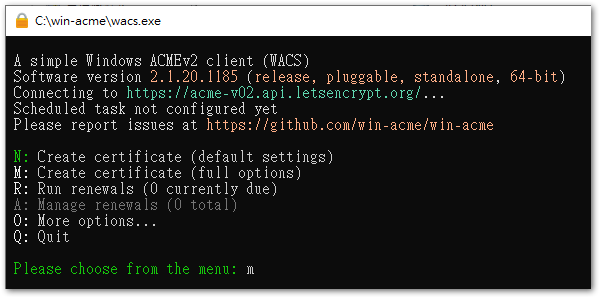
◎ 輸入 “m” 或按 Enter (預設 m),手動設定各參數。
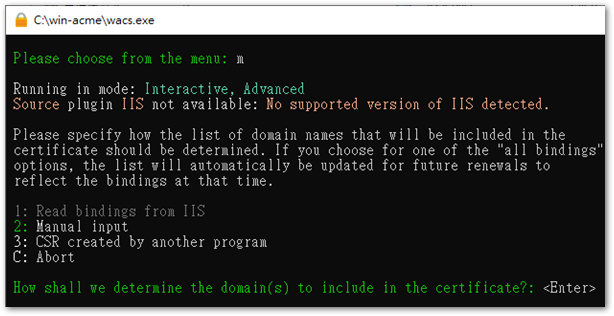
◎ 輸入要申請憑證的網址,如 www.abc.com。
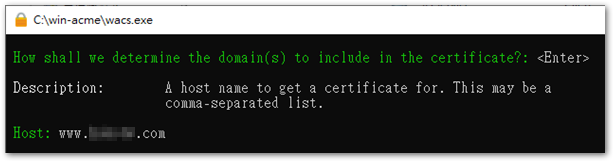
◎ 為此域名輸入一個好識別的別名,Or press Enter to use the default value。

◎ 輸入 “1”,Provide the local website directory path for domain validation。
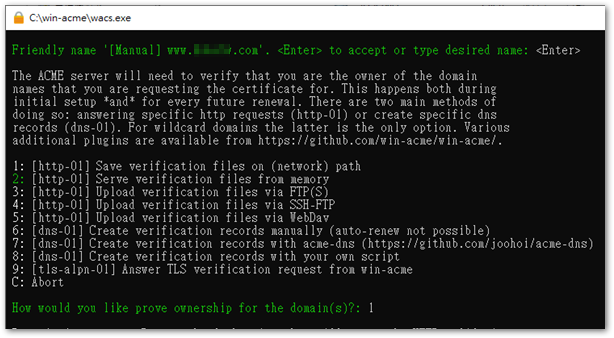
◎ Enter the local website root directory path,For example C:\Web\Apache24\htdocs\abc。
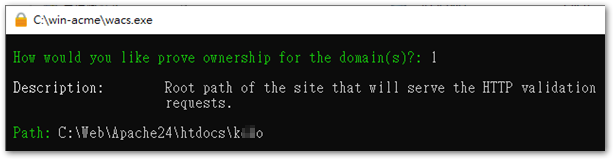
◎ 輸入 “yes”,Allow the program to copy web.config to the website directory for validation。
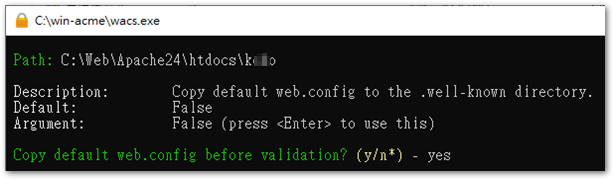
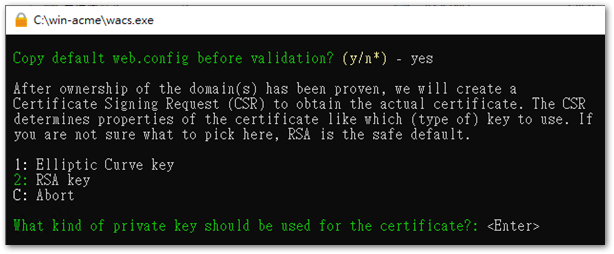
◎ 輸入 “2” 或按 Enter (Default 2),Generate private key with RSA。
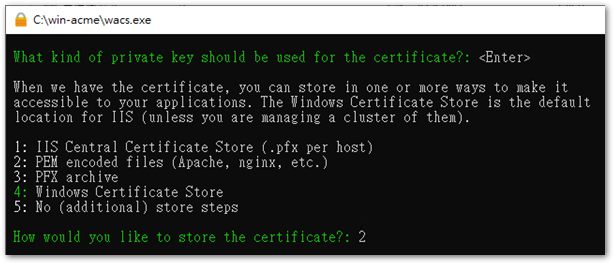
◎ 輸入 “2”,Generate a PEM certificate file suitable for Apache。
◎ Enter the directory path where you want to save the certificate file,For example C:\Web\SSL。
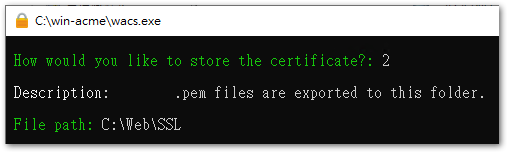
◎ 輸入 “2”,Add a password to the private key,or enter “1” Do not encrypt。
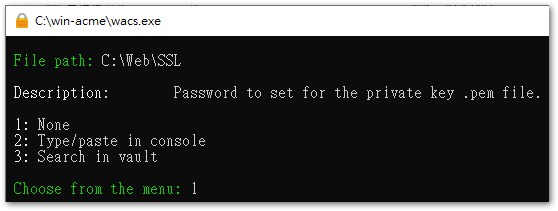
◎ If you do not need to generate a second certificate,輸入 “5” 或按 Enter (Default 5) 繼續。
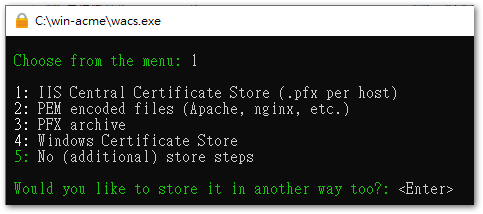
◎ If there are no special requirements,輸入 “3” 或按 Enter (Default 3) 繼續。
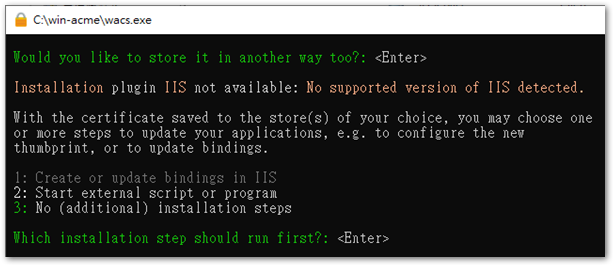
◎ After verification passes,a schedule to check certificate updates will be added in 'Task Scheduler',If this task does not need to be run under a specific identity,輸入 “no” 繼續。
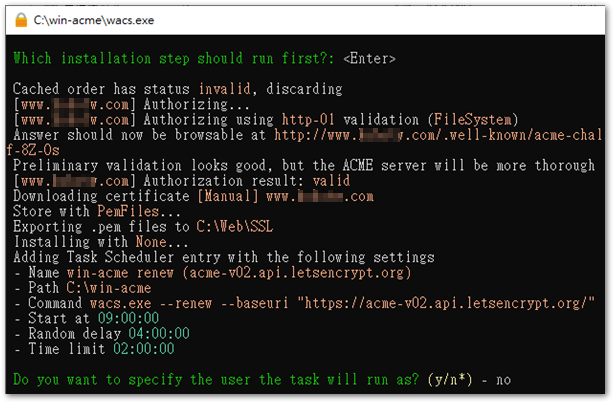
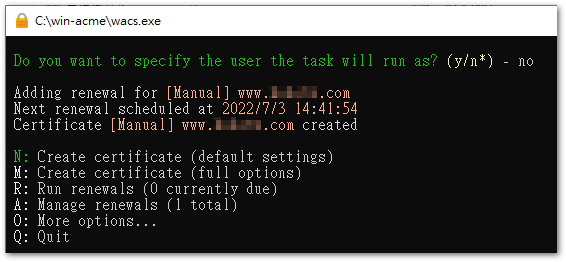
◎ At this point,the certificate application is complete。
◎ Next, you can check the newly generated certificate in the certificate directory。
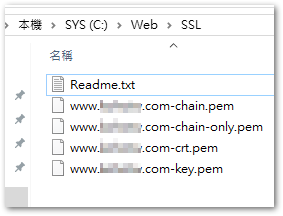
註. *-crt.pem + *-chain-only.pem = *-chain.pem
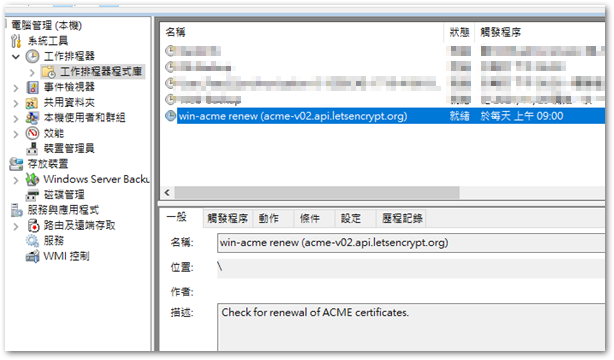
◎ 在「工作排程器」可以看到新增了一個 WIN-ACME 的項目。
◎ 開啟 apache 的 httpd-ahssl.conf (或 httpd-ssl.conf 或 httpd.conf,看你的環境),增加一組 SSL 的 VirtualHost。
<VirtualHost *:443>
  SSLEngine on
  ServerName www.abc.com:443
  SSLCertificateFile "C:\Web\SSL\www.abc.com-chain.pem"
  SSLCertificateKeyFile "C:\Web\SSL\www.abc.com-key.pem"
  DocumentRoot "${SRVROOT}/htdocs/abc"
</virtualhost>
◎ 如果 80 port 的 VirtualHost 不關,但想將 80 自動轉至 443,可在 80 port 的 VirtualHost 增加 “Redirect” 參數。
<VirtualHost *>
 DocumentRoot C:\Web\Apache24\htdocs\abc
 ServerName www.abc.com
 Redirect / https://www.abc.com/
</VirtualHost>
註. https://www.abc.com/ 後面要有斜線,這樣才會將 http://www.abc.com/def 導至 https://www.abc.com/def,否則會變成 http://www.abc.comdef。
[Related Links]
- 在 Windows 申請 Let’s Encrypt wildcard 憑證 | 老森常譚
- Releases · win-acme/win-acme · GitHub
- win-acme
- [apache] Install free SSL and configure 80 Switch to 443 on Windows | A coder walking by the sea – 點部落
- Apache redirect to HTTPS – SSL website security certificate – ztabox.com
- Windows version of Let’s Encrypt for Apache | Old Hong's IT learning system


Leave a Reply