
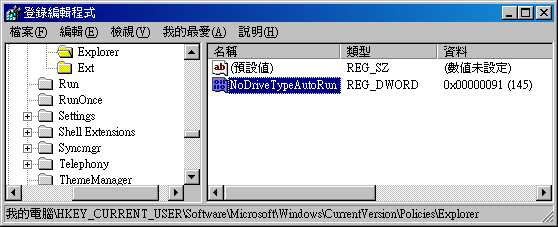
 在桌面按滑鼠右鍵無法出現選單時,請開啟regedit,到以下路徑:
HKEY_URRENT_USER\Software\Microsoft\Windows\CurrentVersion\Policies\Explorer
將右方的「NoViewContexMenu」鍵值移除即可。
一般Explorer底下只會有「NoDriveTypeAutoRun」鍵值,因此如果有其他鍵值,有可能就是有其他功能被鎖住,可依照鍵值名稱去瞭解看看。
[Related Links]
- 我的windowsXP桌面不能按鼠标右键_爱问知识人


只留這兩個嗎
刪了,還是一樣沒反應
有重開機嗎?
前面回答有誤,不該自己建,機碼應該會存在
找不到
HKEY_URRENT_USER\Software\Microsoft\Windows\CurrentVersion\Policies\Explorer
不太可能,不然就自己建