
 最近準備重做幾個網站,因此起了一台新 Server,整個網站環境都從頭建置。今天在安裝 Joomla 4 RC 版時,在資料庫類型 (database type) 的下拉式選單竟只有 “None” 一個選項,反覆查看安裝教學,只提到 “MySQLi” 是最常被使用的,本想說可能是 RC 版的 bug,但想想不太合理,都已經到 RC 版了,不太可能會有這類型的 bug 才是。上網查詢後,原來只是因為沒在 php 啟用 MySQLi 相關的設定。
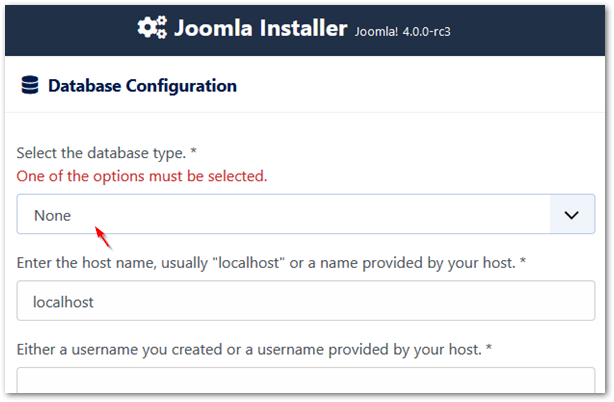
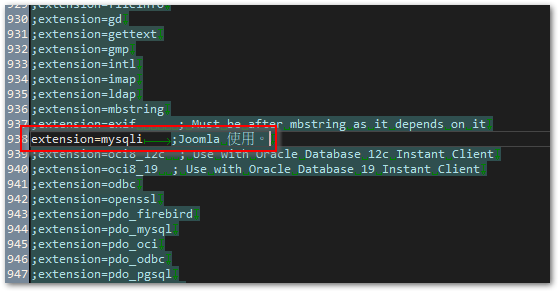
◎ 開啟 php.ini,搜尋 “extension=mysqli”,並將左邊的註解 (;) 移除。
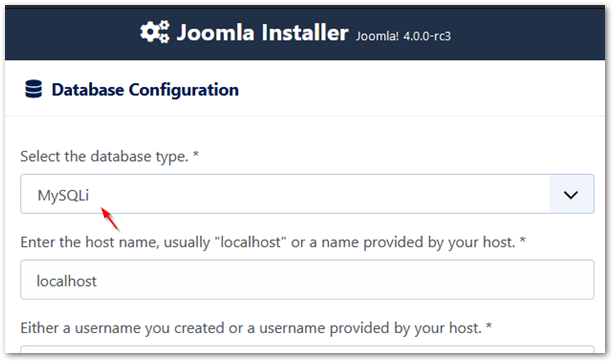
◎ 重新啟用 Apache 服務後,即可看見正確的 MySQLi 選項。
【參考連結】
- Database Type = “None” Only Option Available – Joomla! Forum – community, help and support
- J4.x:安裝 Joomla – Joomla! Documentation


merci pour l’info cela ma bien aidé!!
juste une précision…
on a pas besoin de mettre joomla après
extension= mysqli il faut juste activer
cette ligne en suppriment le point virgule qui se trouve avent la déclaration
Yes.
The words after “;” In the php.ini, it's just a note. It's not necessary.