

【VLAN Setup】
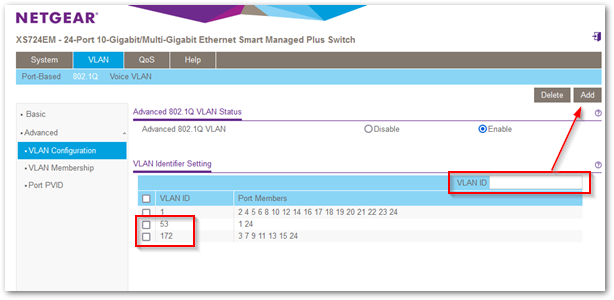
◎ 'VLAN' → '802.1Q' → 'Advanced' → 'VLAN Configuration',Select 'Enable'。
◎ Add VLAN IDs one by one,For example:53、172。
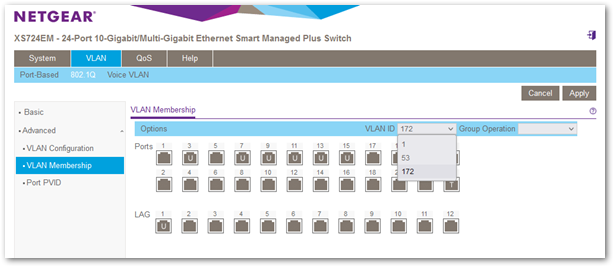
◎ 切換到「VLAN Membership」頁面。
◎ 切換不同的「VLAN ID」,並將設定對象 port 為「U(untag)」或「T(tag)」或「留白」。
PS.
◎ 假設要將 port3 設為 VLAN ID-172/untag,那在 Apply 後,記得切換到 VLAN ID-1,將預設的 untag 改為空白。
◎ 如果是設定 LAG/LACP,其對應的 port 會連動修改,這部份做的很棒。
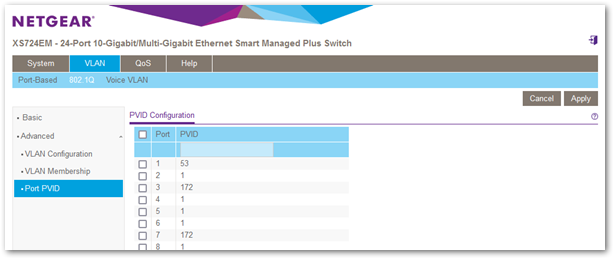
◎ 最後,切換到「Port PVID」頁面,Just set the correct PVID。
[LACP/LAG Settings]
◎ 'System' → 'LAG' → 'LAG Configuration',Set the target 'LAG ID' 'Admin Mode' to 'Enable',Then click 'Apply'。
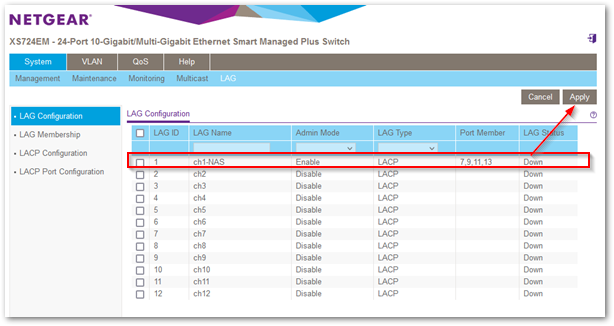
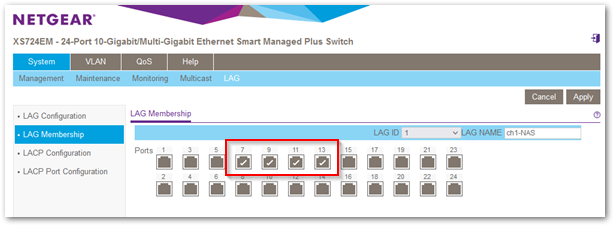
◎ Switch to the 'LAG Membership' page,Select the member ports,Then click 'Apply'。


I saw you recently posted a new entry on your blog。
Will you also update the Fortigate firmware?
您好,由於韌體的需求太多,我現在也忙,所以沒有多餘的時間可以去上傳韌體。
至於未來會不會繼續上傳,目前還說不準。