
 Anson |
 07 7th, 2017|
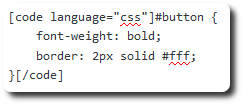
 When writing the htaccess article,all the code I pasted got completely messed up,so I had to search online for related plugins,someone recommended SyntaxHighlighter Evolved,I tried it and was quite satisfied,it seems WordPress.com also uses this plugin,demonstration as follows:
#button {
    font-weight: bold;
    border: 2px solid #fff;
}
[Syntax]
【參考連結】

 之前舊版的Joomla 1.5曾被入侵修改許多檔案,這次整個翻新平臺後,就想加強一些防護措施及習慣,這篇記錄從網路及官方Joomla! Documentation整理的htaccess設定,來提昇Joomla的安全性,官方的文件內容比我列的更多,但部份有點過於太細,或是針對特定套件做的設置,I just didn't bring it over。
 在自己的電腦架了個Joomla網站,之後準備移到正式環境,在將各項目一個一個複製過去後,卻遇到問題無法開啟網站的問題,抽絲剝繭後,Narrowed down to a database issue,When using MySQL before,Simply copying the files under the data directory,Was enough to complete the migration,This time it doesn't work that way,You must use other database tools to export and then import to make it work。I've seen articles about this before,It's best to back up and restore data using export/import,Don't use copy and paste,Finally encountered a problem,So I wanted to understand the reason,After repeated testing and searching online,Finally found the root cause。


