
 在微软的权限设计里,有一个”Remote Desktop Users”的权限给远程桌面使用者使用,但实际上此权限常使一些应用程序无法完全正常操作,使得需要开放”Administrator”权限给远程桌面的使用者,而用户在使用远程桌面时,Sometimes I forget that I am controlling a remote computer,When it's time to get off work,I might directly press the remote shutdown or restart button,Causing the server to go offline。
若要避免此情況發生,可以到群組原則(gpedit.msc),將關機、重開機的按鈕給直接停用,若管理者需要重開機,透過shutdown指令進行即可。
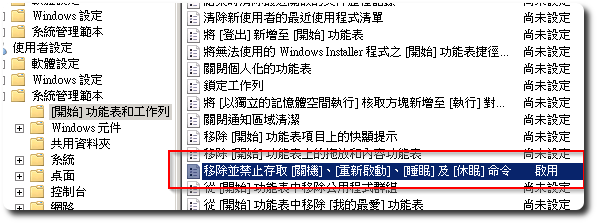
「gpedit.msc」-「使用者設定」-「系統管理範本」-「開始功能表和工作列」,
右邊找到”移除並禁止存取[關機]、[重新啟動]、[睡眠]及[休眠]命令”,
將其設為”Enabled”即可。
【参考链接】


留下回复