
Today found on Windows Server 2019 In,Go to 'Settings' - 'Time & Language' - 'Language',A popup would appear “SystemSettingsAdminFlows.exe” 的错误信息,The content is “Windows 无法访问指定的设备、路径或文件。您可能没有适当的权限,因此无法访问该项目。” 查看了两台 Windows Server 2019 都有相同的消息,Windows Server 2016 及 2012 则正常。
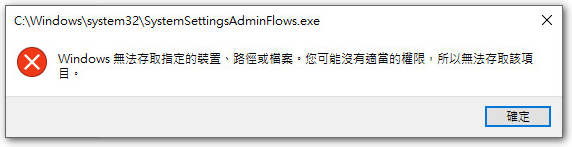
在上網爬文後,在這篇翻譯文章找到解法如下:
開啟「本機安全性原則」,展開「本機原則」-「安全性選項」,在右方找到 “User Account Control: Using the built-in Administrator account's Admin Approval Mode” Item。
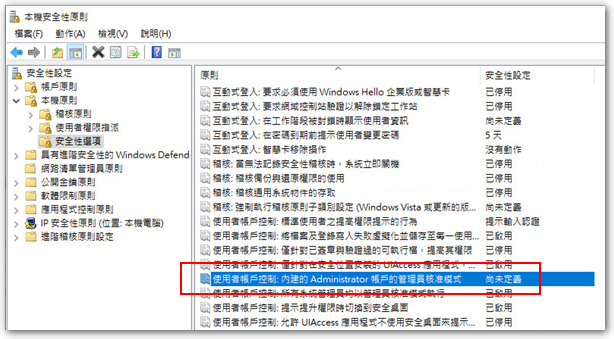
Change the setting to “Enabled”,Then restart,to resolve the issue。
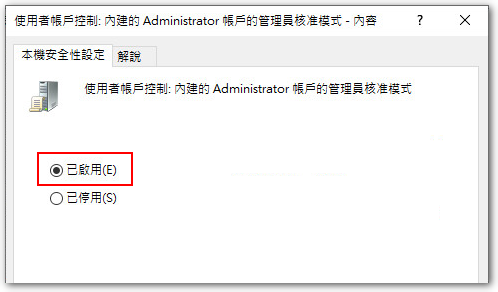
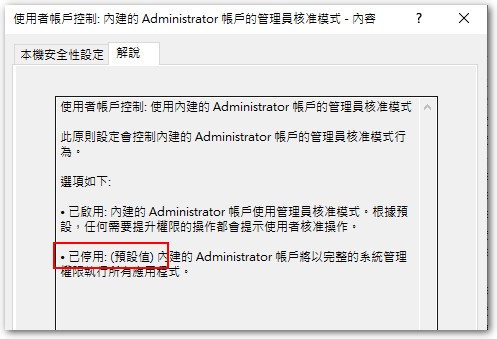
The special point is,Compared to Windows Server 2012 及 2016,The default value here is “Disabled”,而 2019 Although the 'Explanation' says the default value is “Disabled”,Actually it is “Not defined yet”。If you set 2019 改成 “Disabled”,The problem still exists,You must set to “Enabled” for it to work,但是 2012 及 2016 of “Disabled” 卻不會出現 SystemSettingsAdminFlows.exe 權限錯誤,這是個蠻特別的現象。
2020/04/16 更新
從「設定」要進入「變更介面卡選項」也會跳出同樣的錯誤訊息。
【参考资料】
- 活动目录:Windows 10:AD域管理员缺少权限? – 代码错误


Hi 请问您的状况也是在加入域之前正常,加入域后才发生的吗?
您好,我倒没注意到是加域后才发生!
刚刚测试了一下,还真是如此,加入域并登录域管理员,才会有此问题。
如果不加入域,或者加入域后,登录本机管理员,都不会有此问题,感謝您提供資訊 🙂 。