
 參加完 2025 資安大會後,感觉通过限制 IP 来源的防护策略还是有一定的效果,因此就在评估对现有 FortiGate VPN 增加相关设置。首先已确认 FortiGate 可以设置以 国家/ 地理地址 作为识别的‘地址对象’,所以后续就剩相关策略的设置与应用。
原先 AI 建議可以在《防火牆政策》設定 Wan → IPSec 來過濾,但實際測試並沒有擋下來,猜測是因為當建置 IPSec VPN 後,FortiGate 會在《進入本機流量政策 (Local-In)》加入一個政策,允許任何 IP 透過 IPSec 連入而造成《防火牆政策》無效,因此要阻擋的話,也需要從這個 Local In Policy 下手了。
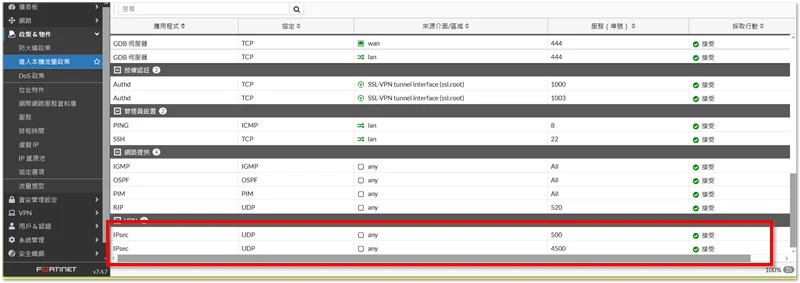
My firmware version is 7.4.7,In the graphical interface,Local In Policy can only be viewed,Cannot be modified,Therefore, after creating the 'Address Objects' for the relevant countries,Next, you need to enter the 'CLI Console',To modify the Local In Policy via commands。
(According to the official documentation,7.6.0 You can then configure it through the GUI。)
[FortiGate Environment]
- Firmware version:7.4.7
- VPN connection method:IPSec
- Configuration purpose:Only allow IPs from specific countries to connect to IPSec VPN。
[CLI Console]
Let me explain first,In terms of priority,Generally, the allow rules may be set first,Then set Deny All,But because I want to confirm that Deny All is effective first,I will set the Deny rule first,Finally, after everything is set, use move to adjust the policy order。
1. Deny all IPs from connecting to IPSec VPN
config firewall local-in-policy
    edit 1
        set intf "virtual-wan-link" # virtual-wan-link 為 Interface 的名稱
        set srcaddr "all"
        set dstaddr "all"
        set action deny
        set service "IKE" "ESP"
        set schedule "always"
    next
end
2. Allow IPs from specific countries to connect to IPSec VPN
config firewall local-in-policy
    edit 2
        set intf "virtual-wan-link"
        set srcaddr "Country-Allow"
        set dstaddr "all"
        set action accept
        set service "IKE" "ESP"
        set schedule "always"
    next
end
3. 调整 local-in-policy 顺序
config firewall local-in-policy
move 2 before 1
end
4. 查看最终设置结果
show firewall local-in-policy
【番外篇】
在测试的过程中,如果想观察相关流量情况,可以通过以下指令进行。
1. 用 sniffer 观察任何进入 500, 4500 端口的流量
diag sniffer packet any 'port 500 or port 4500' 4 # 4 最詳細,1 最簡單

// 按 CTRL + C 結束
2. 用 debug 模式观察来自 123.123.123.123 的前 100 笔流量
diag debug reset
diag debug flow filter addr 123.123.123.123
diag debug flow trace start 100
diag debug enable

diag debug disable
diag debug reset
3. 用 debug 模式观察 IKE 流量
diag debug reset
diag debug console timestamp enable
diag debug application ike -1 # 等級從 1 ~ 15,-1 代表最詳細
diag debug enable

diag debug disable
diag debug reset
《相关链接》
- FortiGate-Local-in policy 介绍与设置 – Andy 的 IT 技术分享网站
- 如何调整 local-in policy 的顺序… – Fortinet 社区


