
呼~有好一段时间没写‘知识技巧’的主题了,开始上班后回家只想休息,周末又只想堕落,实在很糟糕。本周在公司解决了一个不大不小的问题,花了不少时间去测试、研究,总算解决了,在Yahoo知識+也有看到相同的問題,因此逼著自己一定要上來先把這篇完成。
大部分pdf轉檔工具都是模擬成一台虛擬的pdf印表機,user再透過列印的動作來完成pdf轉檔(Adobe Acrobat 則是有兩種方式可供選擇)。一般來說,同一個來源檔都是會轉進一個pdf檔,excel的話,每個工作表會分屬不同頁面,但是有時候卻會發生轉檔程式將一或數個工作表拆開成不同的pdf檔,使得明明是一份excel文件,卻轉出2個以上的pdf檔。剛開始以為是工作表裡的版面配置的問題,經過多方測試,最後才找到問題的癥結在於列印功能的設定。
進入「檔案」-「版面設定」,在「頁面」的標籤底下有個「列印品質」,此處可以設成300dpi或600dpi,但就是不能留白!上述的問題就是因為這個設定值,Leaving a blank space can cause the conversion program to misjudge.,Currently, both PDF Creator and Adobe Printer have the same issue.。
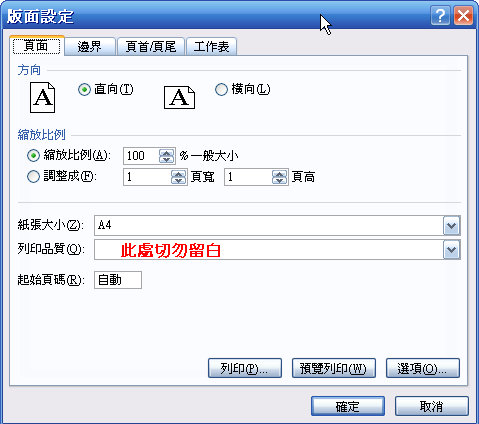
Different versions of Excel may vary slightly.,But they're largely similar.,You can find it if you look for it.。
【相關連結】
- PDF Creator:http://sourceforge.net/projects/pdfcreator


Bothered me for an hour., Thanks a lot.!!!
Glad to be helpful to you~~ 🙂
Everything typed was actually very reasonable..
但是, How about this?? Suppose you composed a catchier title.?
I’m not suggesting your information is not solid., But
Suppose you added a title to possibly grab people’s attention.? I
mean 老森常譚 Excel轉pdf被切成多個檔案的原因 is a little vanilla.
You might peek at Yahoo’s front page aand note how tuey create news titles to get viewers
interested. You might add a related video or a related
picture or twoo to gdab readers excited about everything’ve written.
Just my opinion, it could make your posts a little bbit more interesting.
你真是高手中的高手啊,能够发现这个秘密
運氣好而已,谢谢:)
太感谢了,解决了我困扰多月的问题
不客气:)
真是太感谢啦~~~~我找了好多,终于找到了!!!
不客气 🙂
板主回复:
很高兴能帮到你:)
板主回复:
Glad to be of help:)
板主大人:
真的非常感谢您的这篇文章!帮了我大忙!
谢谢~~~~~~
你真是高手,谢谢捏~受益良多!